Coveralls MCP Server
Overview
Coveralls now includes an MCP server. 🎉 MCP stands for Model Context Protocol, the open standard that AI agents (like Claude Code, Cursor, ChatGPT) use to call a product’s tools over HTTPS.
Coveralls MCP Server v0.1, our first release as of 2026-11-20, focuses on a long-awaited feature: Management Reporting (aka. Cross-Org Reporting, aka. Team Reporting). Given the ubiquity of LLMs and AI agents, we have decided to release these features via MCP, first.
To get management-level reporting about coverage across all of your projects at Coveralls, connect your agent to Coveralls once; then you can ask it about your coverage in plain language:
- “Which owners are below our 80 percent target this week?”
- “Will pull request 1234 pass our coverage check?”
- “Which lines of
planning/route.pylost coverage in the last build?” - “Which folders of the
backendsubproject are weakest?”
The agent calls the server’s seven tools, reads the numbers, and writes the answer, as a table you can paste into a report, or as data it can formulate into a dashboard.
- Resource: your Coveralls coverage data (repositories, builds, files, folders)
- Actions: read only
- URI:
https://coveralls.io/mcp - Transport: MCP over HTTP (JSON-RPC)
- Authentication: Personal API Token, sent as
Authorization: Bearer <token> - Full guide: Coveralls MCP Server v0.1 User Guide (PDF)
What v0.1 of the Coveralls MCP Server does not do
- It is read-only. No tool changes anything in Coveralls. The agent cannot edit settings, delete builds or change a repository.
- It never returns source code. Coveralls does not store your source code, and the server does not fetch it. It reports line numbers and hit counts. Your agent already has the code in the engineer’s checkout if it needs to read it.
- It stores nothing about owners or targets. You tell the agent who owns what and what the target is; the server computes the numbers and forgets the question.
- It sees only what the token’s user can see. The agent acts as one Coveralls user and sees exactly that user’s repositories.
Authentication
Requests to the MCP server are authenticated with a Personal API Token from your Coveralls Account Page. Under Personal API Tokens, create a token and copy it; it is shown once.
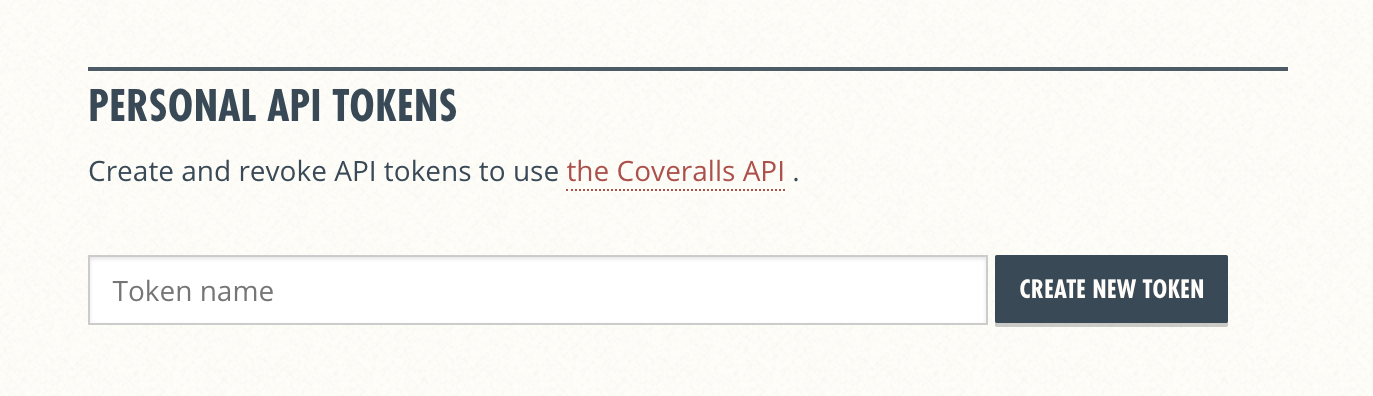
The agent will see exactly the repositories your account can see. For a shared gateway, create the token under a service account rather than a personal one.
The token travels in the Authorization header as a bearer token:
Authorization: Bearer <your token>
Keep the token out of chats, tickets and committed files. If a token leaks, revoke it on the Account Page and create a new one.
Connecting
Nothing is installed. The server is part of coveralls.io, so connecting is one entry in your agent’s MCP settings.
Claude Code
One command does it (type it in a terminal):
claude mcp add --transport http --scope user coveralls https://coveralls.io/mcp --header "Authorization: Bearer <your token>"
Then type /mcp inside Claude Code: coveralls should show as connected with seven tools. Ask the agent “what can you tell me from Coveralls?” to confirm.
Cursor, Claude Desktop and gateways
These take the same address and header in their own MCP settings. The entry is an HTTP (sometimes called “streamable HTTP”) MCP server at https://coveralls.io/mcp with the header Authorization: Bearer <your token>. Here is the shape most clients accept in their JSON settings file:
{
  "mcpServers": {
    "coveralls": {
      "type": "http",
      "url": "https://coveralls.io/mcp",
      "headers": {
        "Authorization": "Bearer <your token>"
      }
    }
  }
}
Check your client’s documentation for the exact file name and location.
The Seven Tools
You never call these yourself. The agent reads their descriptions from the server and picks the right one. Knowing what they answer helps you ask good questions.
| Tool | The question it answers | Example question |
|---|---|---|
list_repos |
Which repositories can this token see, and what is each one's latest coverage? | "List our repos and their coverage." |
get_repo_coverage |
What is one repository's coverage on a branch, per branch and per subproject? | "What is planner at on main?" |
get_build |
Is this build done, what did it report, and how does it compare with the build it is measured against? | "Is build 1234 finished? Did coverage go up?" |
list_files |
Which files in a build are lowest, which changed, which left new lines uncovered? | "Show me the ten least-covered files in the latest build." |
list_directories |
Which folders in a build are weakest? | "Which folders under planning/ are below 70 percent?" |
get_file_coverage |
Which lines of one file are covered, and which lines lost or gained coverage since the base build? | "Which lines of planning/route.py lost coverage?" |
get_owner_coverage |
Is each owner meeting its coverage target, across repositories? | "Are all owners above 80 percent?" |
Example: Coverage per Owner Against a Target
This is the kind of question the server was built for. It takes one request and returns JSON easily formatted into one table, or any artifact your agent chooses to create.
What you say
Use our CODEOWNERS file for
github/acme/planner. Target 80 percent. The docs owner’s target is 50 percent. Also,@acme/perceptionowns all ofgithub/acme/perception.
What the agent does
The agent reads the CODEOWNERS file from the repository:
*             @acme/platform
/planning/    @acme/planning
/perception/  @acme/perception
/docs/        @acme/docs
*.proto       @acme/platform @acme/perception
It turns each line into one segment per owner named on the line. A segment is “this repository, optionally this branch, optionally this pattern, optionally this subproject.” A line with two owners gives both owners the same segment. Then it adds the targets you gave and the extra repository for @acme/perception, and sends one request to get_owner_coverage. Each repository is reported on its default branch unless you name another branch. The server uses the latest finished build on that branch.
What the agent shows you
| Owner | Repository | Segment | Covered / relevant lines | Percent | Change | Pass |
|---|---|---|---|---|---|---|
| @acme/platform | planner | * |
8,410 / 10,250 | 82.0 | ||
*.proto |
120 / 160 | 75.0 | ||||
| owner total | 8,410 / 10,250 | 82.0 | +0.4 | yes | ||
| @acme/planning | planner | /planning/ |
2,980 / 3,400 | 87.6 | ||
| owner total | 2,980 / 3,400 | 87.6 | +1.1 | yes | ||
| @acme/perception | planner | /perception/ |
2,105 / 2,900 | 72.6 | ||
*.proto |
120 / 160 | 75.0 | ||||
| perception | whole repository | unavailable: no finished build on main |
||||
| owner total | 2,225 / 3,060 | 72.7 | — (1 repository unavailable) | |||
| @acme/docs | planner | /docs/ |
310 / 540 | 57.4 | ||
| owner total | 310 / 540 | 57.4 | +2.3 | yes |
How to read it
- A file counts once per repository.
@acme/platformowns*and*.proto. The.protofiles are already inside*, so the owner total is 10,250 relevant lines, not 10,410. Overlapping segments never double-count. - A file with two owners counts for both. The
.protofiles appear under@acme/platformand under@acme/perception. The server reports coverage, not exclusive ownership. - Change is the difference in percentage points between this build and its base build, computed over the same segments.
- Pass is
yesornoagainst the target you gave. It is empty (null) when there is not enough data to judge: no target was given, no file matched, or one of the owner’s repositories was unavailable. Null is not a failure. It says “part of this owner’s code was not measured, so there is no verdict.” - Unavailable means that repository has no finished build on that branch yet (or the build is too large to report per owner). Push a build to that branch and ask again.
You can ask for the same table every week, or ask the agent to keep the CODEOWNERS mapping and the targets in a file in your repository so the question becomes “run the coverage report.”
Other Questions It Answers
- A pull request. “Will PR 1234 in
plannerpass our 80 percent check?” The agent fetches the pull request’s latest build, reads its total and its change against the base build, and lists the changed lines that are still uncovered. The patch coverage percent itself (coverage of only the changed lines) is not returned yet; it is planned for a later release. - A build. “Is build 1234 done? Which parallel job is missing?” The agent reports whether the build finished, which subprojects reported and which have not, and the totals so far.
- A file. “Which lines of
planning/route.pylost coverage in the latest build onmain?” The agent gets the file’s lines for this build and for its base build and reports lines that lost coverage, lines that gained it, and lines still uncovered. The lists are computed by the server, not guessed by the agent. - A folder or a subproject. “Which folders of the
backendsubproject are below 60 percent?” The agent lists the directories of that one parallel job, lowest first.
Limits
- Line comparisons are by line number. When a file’s text changed between two builds, an inserted or deleted line shifts every line below it. The “lost” and “gained” lists then describe positions, not the same code. The agent is told when a file’s text changed and should read the lists together with the file’s diff.
- Lists come in pages of at most 200 rows. The agent asks for the next page when it needs more.
- One branch per repository per request in an owner report. The same repository on two branches is two entries in the answer.
- Numbers come from finished builds. A build still processing is not counted. Ask again in a minute.
- Reports are only as good as the mapping. If a CODEOWNERS line is wrong, the owner’s numbers are wrong in the same way.
- Two agent requests at a time per web server. A third request gets a short “busy, try again” (HTTP 503) answer and agents retry it on their own. If you hit it often, tell us.
Troubleshooting
| What you see | What it usually means | What to do |
|---|---|---|
| The agent says it has no Coveralls tools. | The client entry is missing or disabled. | Check the entry (address and header), then restart the agent. |
| "401" or "unauthorized". | The token is missing, mistyped or was revoked. | Create a new token and update the entry. |
| "Repository not found, or not visible to this token." | The token's user cannot see that repository. | Add the repository to that user, or use a token from a user who can see it. |
| An owner's repository is "unavailable." | No finished build on that branch yet, or the build is too large for per-owner reporting. | Push a build to that branch; or ask on the branch that has builds. |
| "503, try again." | More than two agent requests at once on one web server. | Nothing; agents retry. If it is frequent, tell us. |
| Numbers differ from the Coveralls page. | The agent and the page are looking at different builds or branches. | Ask the agent which build it used, and compare with the build the page shows. |
| A percent is a few points off, every time. | The repository's "Include branch coverage in the coverage percentage" setting. Every answer says which rule it used (percent_includes_branches). |
Compare with the same setting on; or turn the setting on, rerun the build, and ask again. |
If none of these fits, send us the question you asked and the agent’s answer at support@coveralls.io, and we will look at it with you.
User Guide
The full guide for engineering managers, with the worked example above and more, is a five-page PDF: Coveralls MCP Server v0.1 User Guide, Coveralls Cloud edition.
What Comes Next
v0.1 is the first release: management reporting and its foundation. Later releases add the troubleshooting workflows engineers asked for (why a build is slow or stuck, settings and history) and, further out, carefully scoped write actions. Tell us which question you most want the agent to answer next; email us at support@coveralls.io or leave a comment in the associated Announcement.